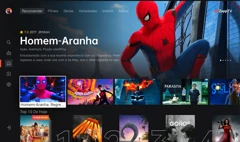





Browse Live TV
Find live TV channels by category, including news, sports, entertainment, movie channels, kids channels, and regional TV.
Explore Live TV
ABOUT ZAPPTV
ZappTV helps you discover live TV channels and on-demand entertainment, then watch through the ZappTV app on supported TV devices and Android mobile.
 Get App
Find live TV channels by category, including news, sports, entertainment, movie channels, kids channels, and regional TV.
Explore Live TVDiscover movies, series, documentaries, kids content, family entertainment, and other on-demand titles.
Browse On-DemandUse the website to browse content. Use the ZappTV app on TV or Android mobile to watch.
Get App
Take your entertainment anywhere. Stream live TV and on-demand content on your phone.

The ultimate cinematic experience. 4K Ultra HD streaming with immersive audio for your living room.
 Available on smart TVs
Use the website to search, browse categories, and discover live channels and on-demand titles.
Explore channels and read about on-demand titles before choosing what to watch.
When you choose to watch, the website guides you to download the app instead of opening a web player.
Install ZappTV on your TV or Android phone and watch through the app.
Movies, series, documentaries, kids content, and more.




Browse live news, sports, entertainment, kids, and regional channels.




Find popular sports, family shows, and easy watching options.




Only download ZappTV from official ZappTV pages. Do not use modified APK files or unknown third-party download links.
Use the TV installation path for TV devices and the Android mobile path for mobile devices.
If your device asks for APK installation permission, follow the official installation instructions.
Use Support for download, installation, activation, or playback questions.
Search, browse categories, and explore titles before deciding what to watch.
Focused support for the devices currently available.
One app for live channels and on-demand entertainment.
Download, installation, activation, and support guides help you get started.